
Volunteer Board Transition Checklist: Roles and Records
Use this volunteer board transition checklist to assign owners, transfer member records and dues, review account access, and hand off documents.

A new treasurer has just been elected, the outgoing treasurer is ready to help, and the member list still lives in a personal spreadsheet. Banking alerts go to a former officer, event registrations sit in someone's inbox, and no one can say which dues reminders have already gone out. That's the moment most clubs and membership nonprofits discover that goodwill isn't a handoff plan.
A useful Volunteer Board Transition Checklist treats the change as a records and access problem. Every item gets an outgoing owner, an incoming owner, a transfer date, and signed proof. The same structure works for a planned rotation and for a sudden vacancy, and it keeps member records, dues, events, and board files with the organization instead of with one volunteer.
Who Owns Each Handoff Task
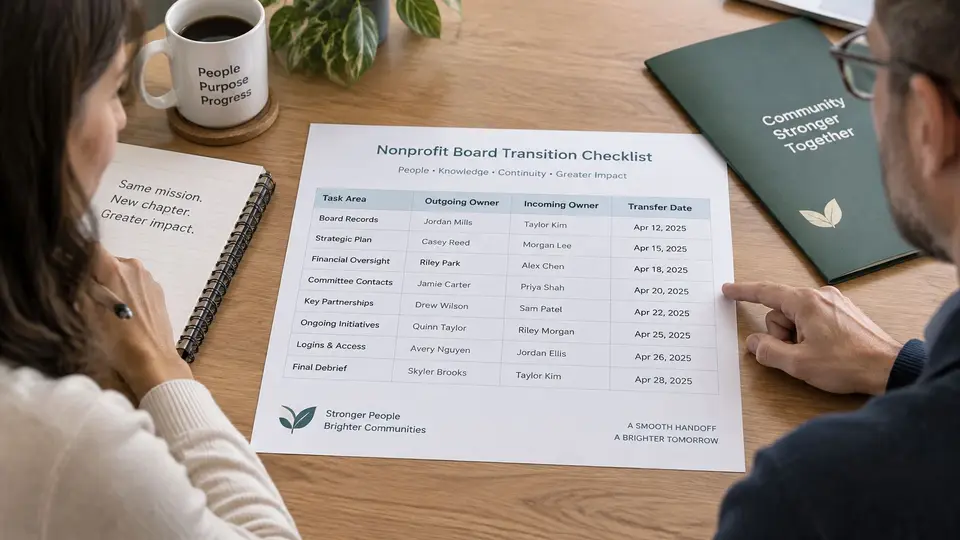
Handoffs stall when a task belongs to the board in general. Name one person on each side instead. The outgoing owner prepares and explains the item, the incoming owner checks it, and both initial the row once the transfer is complete.
Handoff owners by area
| Handoff area | Outgoing owner | Incoming owner | Proof of transfer |
|---|---|---|---|
| Board records and minutes | Outgoing secretary | Incoming secretary | Approved minutes delivered and filed in the shared folder |
| Member records | Outgoing membership coordinator | Incoming membership coordinator | Member list export reviewed and signed |
| Dues and outstanding balances | Outgoing treasurer | Incoming treasurer | Balance report reconciled to payment records |
| Event registrations and bookings | Outgoing events lead | Incoming events lead | Upcoming events and registrant lists confirmed |
| Vendor contacts and renewals | Outgoing board chair | Incoming board chair | Dated vendor list with contract end dates shared |
Adjust the rows to match your roles. A small club might combine secretary and membership coordinator, or split events between two leads. One person can hold several areas, but no row should have a blank on either side. If a role is still unfilled, assign a temporary owner and a date to revisit it.
How to use the proof column
Proof means the incoming owner checked the work, not just received a file. For member records, the outgoing coordinator provides an export on the agreed date and the incoming coordinator checks a sample of ten records against the live member database before signing. For dues, both treasurers compare the balance report to recent payment records and note any open items they can't explain.
Practical rule: A row isn't done when a file is sent. It's done when the incoming owner can open it, check it, and use it without calling the previous officer.
Add a transfer date beside every row and save the completed table in a shared folder owned by the organization, not on a personal drive. Bring any blank rows to the next board meeting. Don't close the handoff until every area carries two names, a date, and proof.
A Handoff Calendar From 90 Days Out
Long-range planning comes first. The BoardSource succession planning guidance recommends starting 12 to 24 months before a planned departure by approving a written succession policy, then reviewing strategy, financial condition, and the skills needed in the next officer cohort. The 90-day calendar below is the operational layer that sits on top of that policy.
Handoff calendar with owners
| Timing | Task | Owner |
|---|---|---|
| 90 days before | Confirm the transition date and name the incoming volunteer | Board chair |
| 60 days before | Start the access inventory and first member record export | Outgoing membership coordinator |
| 30 days before | Reconcile outstanding dues and list open payment reminders | Outgoing treasurer |
| Handover day | Transfer account ownership and sign the handoff log | Board chair and both officers |
| 30 days after | Check the first month of payments and registrations for gaps | Incoming treasurer and membership coordinator |
| 90 days after | Run the full access review and close the handoff log | Board chair |
The dates aren't arbitrary. At 90 days out, the chair locks the transition date and names the successor, which leaves time for questions while the outgoing officer is still doing the job. Elections without a named incoming owner produce a gap that everyone assumes someone else will fill.
At 60 days out, the access inventory starts because systems can't be transferred until they're listed. A first member record export at the same point surfaces duplicates and missing email addresses while there's still time to fix them.
At 30 days out, the treasurer reconciles dues while unusual payments, partial payments, and returned online payments can still be explained from memory. Two weeks before handover, schedule a shadow session so the incoming events lead handles real registrations once before working alone.
Handover day is when ownership changes and both officers sign the log. The work doesn't end there. At 30 days after, the new team checks its first month of payments and registrations for gaps while outgoing officers are still reachable. At 90 days after, the chair runs the full access review and closes the log at a board meeting.
What to Do When a Board Member Leaves Unexpectedly
A sudden departure skips the calendar, so the order of the first steps matters more than speed alone.
- Name interim authority in writing. The remaining officers or the board confirm who may approve payments, sign documents, and speak for the organization until a replacement is seated. Check the bylaws for how vacancies are filled, record the decision in the minutes, and give the interim role an end date.
- Protect access first. Confirm that banking, payment, email, and membership accounts list at least two current officers as owners or administrators. Move ownership and recovery addresses to organization-controlled ones. Don't ask for or reuse the departed person's password.
- Secure the records. Export the member list, dues ledger, latest minutes, and vendor list into the organization folder. Ask the departing volunteer to search personal email and drives for organization files and move anything found.
- Assign one communications lead. That person answers questions from members, funders, and partners using short approved wording that states what's known and what isn't settled yet. Scattered replies from several officers create conflicting versions.
- Open an items list. Give every gap an owner and a due date, and schedule a meeting within two weeks to appoint a replacement and assign the handoff areas.
Succession isn't mainly a document storage problem. It's a decision rights problem, and interim authority is the first decision to get on paper.
Cross-training two people per critical function protects a small volunteer-led group better than a long manual nobody reads.
Member Records and Event Registrations to Hand Over
Member records are usually the largest handoff item, and the easiest to hand over badly. A raw export full of duplicates just moves the mess to a new owner.
Clean the member list before transfer
Start with a full export of the member list on an agreed date, then clean it together before signing off. Look for these common problems:
- Duplicate entries: the same person entered twice with slightly different name spellings
- Missing email addresses: members who can't receive dues reminders or event confirmations
- Households entered twice: one record under each adult, with different renewal dates
- Stale membership levels: members still listed at a level they left at the last renewal
- Unlinked applications: approved membership applications that never became full member records
The outgoing coordinator explains how levels, groups, and renewals are organized, since that logic rarely shows in an export. The incoming coordinator confirms the cleaned list matches the live database before signing.
Pull upcoming event registrations
Next, export registrations for every upcoming event, including waitlists and cancellations. The table below is a hypothetical sample registration form for a spring event. All names, dates, and entries are examples only. Use it to check whether real forms capture what the new team needs.
| Form field | Sample entry (hypothetical) | Purpose at handoff |
|---|---|---|
| Full name | Maria Lopez | Matches the registration to one member record and prevents duplicates |
| Email address | maria.lopez@example.com | Main channel for confirmations, reminders and changes |
| Membership level | Household member | Confirms the member price and eligibility for the event |
| Event and session | Spring Cleanup, Saturday morning session | Lets the incoming events lead confirm headcount and schedule |
| Seat count | 2 adults | Sets capacity and the number of places to hold |
| Access or dietary needs | Vegetarian; step-free entrance needed | Gives the host what they need to plan the event safely |
| Payment status | Paid online | Shows the treasurer which registrations still need reconciling |
| Waiver or terms checkbox | Accepted | Records that the member agreed to the event terms |
| Consent to contact | Yes, email only | Carries communication preferences into the new team's messages |
Name and email tie the registration to the member record, so a typo in either one creates a duplicate later. Membership level tells the team whether the member should see member pricing. Session, seat count, and access needs drive room capacity and food planning, while payment status shows the treasurer what still needs reconciling.
The waiver and consent checkboxes matter more than they look. They record that the member agreed to the event terms and set how the organization may contact them. If those answers don't transfer, the new team may email someone who asked not to be contacted that way.
Have the outgoing events lead walk through two or three real forms with the incoming lead before the first event. Field labels that look obvious often carry local habits, such as a notes box the team uses for scholarship requests.
Documents and Vendor Contacts to Hand Over
Some records shouldn't be treated as ordinary files. The IRS compliance guide for public charities identifies the exemption application, IRS determination letter, articles of incorporation, bylaws and amendments, and board minutes as permanent records. Confirm those documents sit in an organization-controlled location before anyone leaves.
Work through the groups below, ordered by who needs them first.
Governing documents go to the incoming secretary. That set includes articles of incorporation, bylaws and amendments, and any formation or tax-status letters the organization holds. The secretary confirms the files open and that the newest amendment is present, not just the original bylaws.
Board minutes and written actions also go to the secretary. Hand over approved minutes, written consents, committee actions, and pending resolutions, documented close to when they occurred. Personal email threads and informal notes don't substitute for a decision record the new board can rely on.
Conflict-of-interest records go to the incoming chair. Include the current policy, signed annual disclosure statements for officers and directors, and notes on recusals from recent votes. The chair also owns collecting signatures from incoming volunteers.
Financial records go to the incoming treasurer. Provide the latest financial statements, payment reports, and supporting workpapers, with the location of each file written down. Note the latest filing year and any unresolved questions before authority changes hands.
Finally, the vendor list goes to the incoming chair. For each vendor, record the name, service, main contact, phone, email, contract end date, and who signed the agreement. End dates matter because a renewal deadline missed during a transition is rarely recoverable later.
Before handover day, have each incoming officer open their files from the shared location. A personal copy or an email attachment shouldn't be the only copy. Log any missing item on the open items list with an owner and due date.
Account Ownership and Access Review
The most common access mistake is a shared personal password passed from officer to officer. The second is leaving a departed volunteer as the only administrator. Both create a hidden owner who can lock the organization out of its own systems.

Build the access inventory
List every system the board touches, including shared email, cloud drives, payment tools, membership software, event pages, website and domain logins, social media, authentication devices, and API credentials. The nonprofit IT support guidance from 7Tech recommends treating board transitions as recurring access-control events, with role-based permissions, password management, multifactor authentication, and timely access removal.
Access transfer by system
| System | Outgoing owner | Transfer method | Review by |
|---|---|---|---|
| Membership software administrator | Outgoing board chair | Assign the incoming chair a role with the needed permissions, then remove the old admin | Handover day |
| Shared email account | Outgoing secretary | Change the account owner or recovery address to an organization-controlled address | Handover day |
| Cloud drive folder | Outgoing treasurer | Transfer folder ownership to the organization account | Handover day |
| Payment tool login | Outgoing treasurer | Add the incoming treasurer as a user with the needed role, and keep approval for payouts with two people where the tool allows | Handover day |
| Website and domain login | Outgoing communications lead | Move the login to a role-based organization account | 30 days after |
| Social media accounts | Outgoing communications lead | Add the incoming lead as an admin, then remove personal links to the account | 30 days after |
The pattern is the same in every row: transfer ownership, don't share passwords. Use roles and permissions so each officer holds only the access the job needs. Where a shared password already exists, change it in a password manager after handover and remove the old access. Require multifactor authentication on critical accounts, and make sure the recovery method points to an organization address rather than a personal phone.
Timing needs one careful exception. Removing a departing treasurer immediately can block the only person who knows how to finish a payment reconciliation. A safer approach is time-limited, read-only handover access with dual approval, followed by formal revocation on a set date and a note in the handoff log. campai supports roles and permissions, so an officer can view dues and payment status without holding a full administrator role.
After the new board is seated, review every permission again. Access granted during a busy transition week tends to linger longer than intended.
Sign Off the Handoff and Schedule the First Review
Treat the handoff as complete only when both sides have signed it. Bring the outgoing and incoming owners into one review, read the log line by line, and initial each transfer as finished or still open.
Confirm the log is complete and every open item has an owner and due date. Track each gap the same way: a missing vendor contract, an unreconciled payment, or a disclosure form still unsigned gets a named owner, a transfer method, and a date. Track every open item so gaps stay visible after the handover.
Before outgoing officers leave, put the 90-day access review on the board chair's calendar and store the signed log in the shared organization folder. At that review, reopen the log first, check that each pending item has closed, and confirm no access or responsibility still sits with a departed officer.
For a planned rotation or a sudden departure, the signed log is the proof the next board starts from.