
Member Directory Software: A Practical Buyer's Guide
Learn how to choose member directory software for your club or association: fields, consent, permissions, maintenance and vendor criteria.

The trip-planning volunteer needs a way for members to find nearby skiing partners. The membership coordinator has a spreadsheet, but it also contains payment history, emergency contacts, and application notes. Sharing that file would solve the contact problem by creating a bigger privacy problem.
Member directory software should publish a deliberately chosen subset of member information, not expose the administrator's working records. For clubs and associations choosing membership management software, the right starting point is a publishing policy: which members appear, which fields appear, who can search, and how members change their preferences.
Directory, Database and Portal at a Glance
A member directory is the part of a system that members, or a selected group of members, can search to find and contact one another. It isn't the full administrator member database, and it isn't the whole member portal.
Member directory, database and portal compared
| Element | Primary purpose | Who sees it | Typical content |
|---|---|---|---|
| Member directory | Helps members find and contact each other | Members, according to sharing settings | First name, city, photo, role, chosen contact method |
| Administrator member database | Runs membership operations | Staff and authorized volunteers | Membership type, dues status, payments, applications, internal notes |
| Member portal | Self-service for each member | Each member, for their own record and permitted services | Profile updates, renewals, event registration, messages |
The member database holds the operational record. Staff use it to process membership applications, assign membership levels/types, track membership dues and renewals, and manage onboarding. Dues are membership payments; donations are voluntary gifts, and those records shouldn't be confused.
The directory is a published view of selected information, released with the member's consent. The member portal is the logged-in space for member self-service, such as updating details, renewing membership, registering for events, and accessing messages where supported.
One Record, Different Views
Consider a hypothetical Dallas ski club with 180 members. Of those members, 120 choose to show their first name and city, 40 choose to display a photo, and 15 instructors share a phone number.
Those choices don't require separate contact lists. One member record can supply the administrator's working view, the member's own profile, and an appropriately restricted directory listing. A private emergency contact remains in the operational record without appearing beside a skiing profile.
Buying rule: Define the database, directory, and portal separately before comparing products. Each needs different fields, permissions, and vendor questions.
For a field review this week, the membership coordinator can list every field members currently complete and label its uses: database-only, directory, or portal. A field may serve several layers, but its visibility must be explicit.
Some platforms bundle these layers; others separate them. For associations evaluating association management software (AMS), the product category alone doesn't establish whether directory publishing is included.
Fields to Show, Restrict or Leave Out
Treat the directory as a published view with its own field list, separate from the operational member database behind it. Each published field should exist because a member-facing task needs it.
Suggested visibility for common directory fields
| Field | Suggested visibility | Reason |
|---|---|---|
| Full name | Shared with members | Core identity for finding someone |
| Role or committee position | Shared with members, optional | Helps members identify the right contact |
| City or neighborhood | Shared with members, optional | Supports nearby matching without a street address |
| Photo | Members who opt in | Personal images need an explicit choice |
| Skill level or interests | Shared with members, optional | Supports activity pairing and carpool matching |
| Email address | Members who opt in | Limits unwanted exposure |
| Phone number | Staff, unless the member opts in | Keeps a direct contact path internal |
| Membership type and dues status | Staff | Financial and status information isn't for peers |
| Payment history | Staff, treasurer access | Financial records need restricted access |
| Date of birth | Not published | Rarely needed for directory use |
| Emergency contact | Staff, restricted | Safety information belongs in the operational record |
| Volunteer notes or application evidence | Staff | Internal review material |
These are recommended starting settings. Directory participation must still be established first, and an organization may choose a preferred display name instead of a full name.
Publish the fewest fields that make the directory useful. A club needs enough information to help members find an activity partner, arrange a pairing, or contact a committee colleague. It doesn't need a searchable copy of every application answer.
A Copyable Field-Review Worksheet
The membership coordinator should complete a worksheet before configuring the directory. The following example uses hypothetical decisions from a regional cycling club.
| Field name | Who needs it | Who may see it | Reason for that visibility | Review date |
|---|---|---|---|---|
| City | Members arranging carpools to ride starts | Members, after opt-in | Nearby matching | Before next renewal |
| Skill level | Members arranging ride partners | Members, after opt-in | Suitable pace pairing | Before next renewal |
| Emergency contact | Coordinator and assigned ride safety lead | Restricted staff roles | Emergency response | Before next organized ride |
| Dues status | Coordinator and treasurer | Authorized staff only | Membership administration | Before next renewal |
In that club, a member interested in carpool matching might share city and skill level while keeping contact details internal. The coordinator can hold an emergency contact in the operational record without exposing it to other members.
A full street address is excessive when a city answers the matching question. Publishing dues status can reveal who is behind on payments, even if the organization only intended to identify active members.
A shared spreadsheet of the full member database is an uncontrolled copy of operational records.
Collection also deserves scrutiny. If a field has no operational purpose, the organization should leave it off the form rather than collect it and promise to keep it hidden.
Before any new field goes live, its owner should record the audience, purpose, and review date. Visibility is a configuration decision to make before collection, not after publication.
Consent and Preferences Members Can Trust
Directory participation should be understandable without a staff explanation. A member should be able to see what will appear, who can see it, and how to reverse the decision.
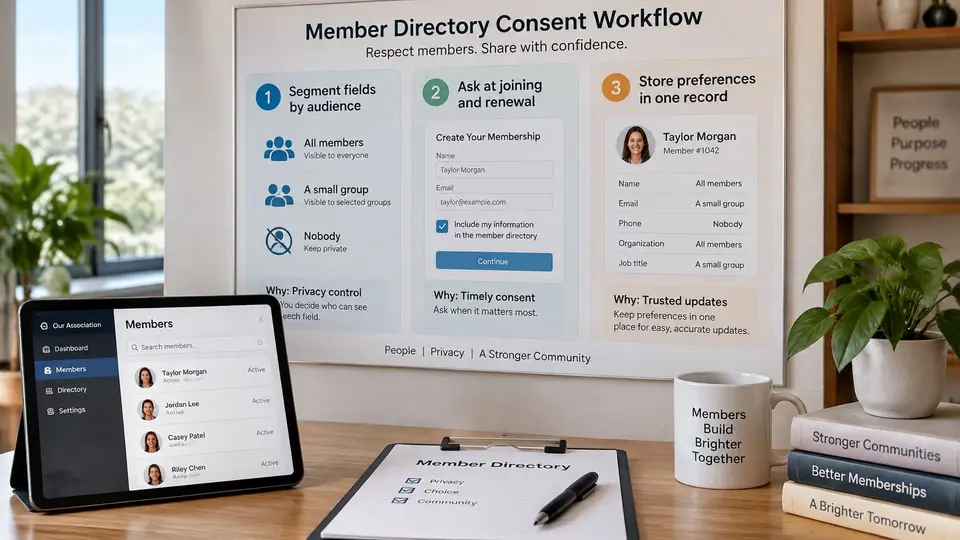
A Practical Consent Process
Assign an audience to each field. The coordinator identifies whether information serves all members, a particular group, or nobody outside staff. This prevents an optional profile field from becoming organization-wide information by accident.
Ask at joining and each renewal, using separate choices on one screen rather than a blanket checkbox. Members shouldn't have to accept phone-number publication merely to share an interest or committee role.
Offer clear visibility options. Suitable choices include all members, the member's group only, or private. Any option offered on the form must match a restriction the platform can enforce.
Keep phone, email, photo, and location private by default. Silence shouldn't be interpreted as a willingness to publish personal information.
Record the choice and its date. The record should also identify whether the member or a staff member entered it. Staff-assisted changes need an attributable instruction, such as an email or signed form, rather than an undocumented assumption.
Provide an ongoing change route through the member app, member portal, or a written request to the membership coordinator. A request made by email or over the phone should be logged the same way as one submitted in the app. Preferences aren't trustworthy if withdrawal requires chasing a departed volunteer.
Remove departing or lapsed members from the published view. The administrator should apply the organization's retention rule separately to the underlying records rather than leave former members searchable indefinitely.
Wording Members Can Understand
A member's completed preference summary could read:
Show my first name, city and photo to other members. Keep my phone and email private.
The statement should list only the choices the member made. The form should make it equally easy to choose a first name without a photo.
Pre-checked contact-sharing boxes fail the practical test of meaningful consent because they record inaction rather than a deliberate selection. Members who never respond should remain hidden, with a reminder and a stated response deadline.
The coordinator should run a quarterly opt-out check, comparing withdrawn permissions against the live directory. Pull the records of members who withdrew a field that quarter and confirm each field is absent from the member-facing view. A logged request fails the member when the field is still published.
Search and Permissions by Role
Example role permissions for a directory
| Role | Search directory | Sees contact details | Edits own record | Exports lists |
|---|---|---|---|---|
| Member | Published fields only | Only what the member shared | Yes | No |
| Volunteer committee member | Published fields only | Shared fields only | No under committee role | No |
| Membership coordinator | Full member database | Yes, for assigned members | Yes, administrative fields | Membership fields only |
| Treasurer | Full member database | Payment-related fields | No | Payment-related exports only |
| Administrator | Full member database | Yes | Yes | Yes, with logged exports |
This is an example configuration to adapt, not a list of vendor features. A volunteer who is also a member can retain personal self-service through the member role without receiving broader editing rights through the committee role.
Access decisions should answer separate questions: who can search, which fields each role can see, and who can export. A treasurer who can locate a member record needs payment fields for that work. Application evidence and emergency contacts sit outside that scope.
Separate Member Search From Staff Search
Member-facing search should work only with published information. Useful filters might include city, interests, committee role, or skill level, provided the member agreed to share those fields.
Staff search serves a different purpose. A coordinator may need to find pending membership applications or identify records with outstanding payment status. Those filters belong in the administrative view, kept away from the peer directory.
Hidden fields must remain hidden in search behavior, too. A buyer should test whether a private phone number can still locate a profile, appear in a filter, or surface in a search preview.
Run that test through each role in the table above. Sign in with a volunteer-level account, search for a member known to keep phone and email private, and confirm the preview shows only shared fields. Repeat the check after any permission change, because a single broad role assignment can widen what search returns.
Exports Need Tighter Control
A downloaded comma-separated values (CSV) file creates a copy outside the live directory. Later changes to member preferences leave that file unchanged.
Limit general membership exports to administrators and the membership coordinator. Any treasurer exception should cover payment-related records only, with an identified purpose and owner.
The National Institute of Standards and Technology's security-metrics guidance recommends evaluating logs for granted requests, denied requests, failures, and configurable audit functions. A buyer should expect an attributable trail for views, changes, and exports, then verify which events the actual product records.
Useful audit evidence identifies the user, affected record, time, action, and outcome. Denied access matters because a blocked attempt can reveal a mistaken role assignment or an inappropriate request. Field restrictions, search behavior, export controls, and audit coverage all need testing against the organization's chosen configuration before launch.
Twice yearly, the administrator should remove departed volunteers, confirm treasurer access, and run a member-level search to ensure only published fields appear.
Keeping Directory Records Accurate
One-off cleanup campaigns never hold. A directory stays accurate through a maintenance calendar, with each recurring task assigned to a named person and a backup for when volunteers change roles.
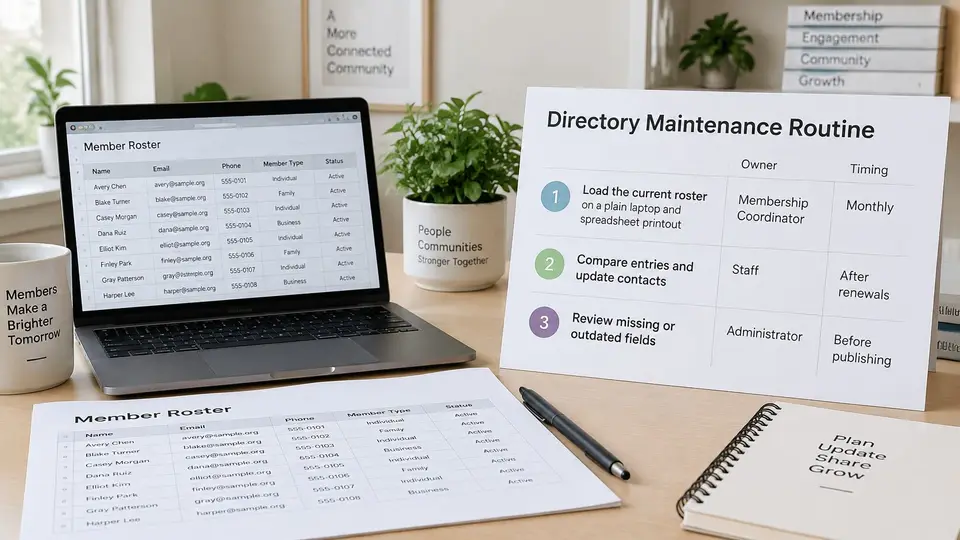
An Owned Maintenance Routine
Load the current roster before launch. Owner: membership coordinator. If the platform supports file import, export the existing roster to a spreadsheet or CSV file, map its columns, and examine the preview before running the import. Check that a consent column has not been mistaken for a membership-status field.
Review duplicates monthly. Owner: membership coordinator. Pay particular attention to members who joined under different email addresses. Before merging, identify the correct membership history and preserve the current sharing preferences rather than accepting whichever record happens to survive.
At renewal, the membership coordinator sends each member the fields currently published, with a route to correct them. The review should display the actual directory entries so members confirm specific fields instead of giving a blanket answer to a general currency check.
Apply the end-date rule already set. Owner: administrator. The consent decisions determine when a lapsed or former member leaves the published view, and this task verifies that it happened. Underlying records follow the approved retention rule, and any membership grace period needs an explicit directory-access decision.
Review bounced emails quarterly. Owner: communications volunteer. Treat each bounce as a contact problem and confirm the address with the member through an available contact route. Change the record only after the member confirms.
Review fields and retention annually. Owner: board or administrator. Archive the approved published-field configuration and a restricted publication snapshot so the board can establish what was visible at a given time. Those archives need their own access limits and deletion schedule.
Whatever import path the platform offers, run the migration check on representative records that include missing values, duplicate emails, and different sharing choices before trusting the preview.
A Season-End Check
Take a hypothetical 180-member organization where 22 members lapse at season end. The coordinator removes those 22 listings in a batch, then checks the member-facing view to confirm none remains searchable.
The sweep should cover saved group views and any separately published lists alongside the main directory screen. Confirm each published view directly after the update, because the member-facing result is the only evidence that counts.
Role reviews stay on the twice-yearly access schedule. Keeping record maintenance and access review as separate calendar tasks prevents a clean roster from masking an outdated volunteer account.
Maintenance standard: Every correction needs an owner, a due date, and confirmation in the member-facing view.
Vendor Criteria and Scope Decision
Vendor criteria to test before buying
| Criterion | Question to ask | Good answer |
|---|---|---|
| Directory scope | Can a directory be published to members separately from the administrator database, limited to selected fields? | Yes, confirmed in demo |
| Field-level visibility | Can each field have its own visibility setting rather than a profile-wide setting? | Per-field settings, confirmed in demo |
| Member consent | Are choices dated, and can members change them in self-service? | Dated record with change history |
| Role granularity | Can roles restrict fields, search, and exports independently? | Each configured separately to match the role matrix |
| Audit trail | Are views, edits, exports, and denied attempts logged, and how long are logs kept? | User, time, and outcome recorded; retention stated in writing |
| Import and maintenance | Can a CSV import include mapping and preview, and can lapsed listings be removed in bulk? | Each step demonstrated |
| Member self-service | Can members update their own details in the member portal or app? | Yes, for their own record only |
| Integrations and APIs | Can data move through documented application programming interfaces (APIs) or webhooks, and can a custom app be built? | Documented options confirmed for the workflow |
| Setup help | Does onboarding cover defining fields and permissions? | Scope and any cost confirmed in writing |
| US pricing | What is current US pricing, including its date and the rule for counting members? | Dated written quote with member-count rule |
Make the Demo a Working Test
Treat every row in that table as a live demonstration, never a slide answer. A useful test set contains about 50 representative member records: incomplete profiles, lapsed memberships, group assignments, and conflicting sharing choices.
Use a controlled sample export rather than real records. Strip out sensitive information the test does not need, and get the vendor's access and deletion arrangements in writing before you share a single row.
Have each vendor label every requirement in writing as standard, configurable, or custom work. Treat a promised customization as separate from an included setting, especially when volunteers will maintain it.
Words like "secure" and "flexible" prove nothing. Ask the demonstrator to configure your role matrix, log in as a volunteer, attempt an export, and show the logged result.
Search testing should cover an ordinary name lookup, combined filters, and a no-results search. Then check the member experience on a phone: change a preference, save it, and confirm the published view changed.
Close the Scope Before Launch
The membership coordinator completes the field worksheet and drafts the preference-screen wording. The board approves the role matrix and retention rule. The administrator sends the same written scope to a small vendor shortlist, so every quote prices identical requirements.
Directory publishing deserves board sign-off before any live listing reaches members. The purchase approval and the publishing approval are two separate decisions. The second one covers the publication audience and the launch checklist.
A wider membership management platform may also connect groups, documents, forms, donations, receipts, spaces, financial records, tasks, and custom applications. Those capabilities can support daily operations. They still need a demonstrated directory workflow, and compatibility with your accounting system needs its own confirmation.
One platform in this category, campai, connects member records, dues, events, and communication, with permissions, apps, and APIs supporting workflows. Its setup package includes help importing member records, configuring dues, and preparing the team's workspace. Whether it fits your scope depends on the same test as every other candidate: a directory demonstrated field by field and role by role is worth buying, and everything else is a promise.