
Membership Management Software vs CRM for Associations
Learn how membership management software vs CRM differs for associations, covering dues, renewals, events, permissions and integrations, plus when each fits.

Your treasurer needs a current dues list for Thursday's board meeting, your membership coordinator is checking renewal dates in a spreadsheet, and a volunteer is working from an older contact list. Each file looks reasonable on its own, but nobody can say which one is right. That's usually when the question of membership management software vs CRM stops being abstract and becomes a practical decision about where member information should live.
Membership Management Software vs CRM at a Glance
Membership management software organizes the full member lifecycle, from application through onboarding, renewal, lapse, and reactivation. A general CRM (customer relationship management system) tracks contacts, accounts, and sales or fundraising relationships, often organized around prospects, opportunities, and pipeline stages.
Professional and trade associations often use the term AMS (association management software) for the same category as membership management software. Clubs and membership-based nonprofits more often use the membership management label, but the underlying question is the same. Which system should own membership status, dues, and renewals?
Neither category is always better. The right fit depends on the work your team does most, who needs access, and how much configuration your staff and volunteers can realistically maintain. A system that's flexible on paper can still be the wrong starting point if nobody owns its custom fields, workflows, and data checks.
Use the table below as a scorecard. Read each row for what comes natively and what usually needs configuration, add-ons, or a second product.
| Criterion | Membership management software | General CRM |
|---|---|---|
| Core record | Member with membership status, type, and history | Contact or account with relationship history |
| Member lifecycle | Joining, onboarding, renewal, lapse, and reactivation tracked as standard records | Usually built with custom objects, fields, and workflows |
| Dues and billing | Dues by membership type, due dates, payment status, and reminders | Often needs add-ons or custom development |
| Renewals | Renewal dates, eligibility windows, and lapsed status | Typically tracked manually or through campaigns |
| Events | Registration, bookings, and participant lists linked to the member record | Often a separate event tool connected by integration |
| Communications | Messages to segments defined by membership type, status, or committee | Campaign and segmentation tools, which may not reference dues status without a sync |
| Permissions | Roles that limit staff and volunteer access to member data | Team and record permissions, varying by product |
| Member self-service | Member portal or app for profile updates, payments, and event access | Often requires a separate portal product |
| Integrations | Connections to other tools through APIs and webhooks, confirmed case by case | Broad connector ecosystems, depending on the vendor |
Before moving on, mark the three criteria that matter most for your organization. Keep those three in view as you compare options, because they usually point to the better starting point more clearly than a long feature list does.
How Each System Models a Member Record
The data model determines where staff look to confirm a person's membership. Membership software can keep a member's status, committee role, event history, and donation in one record. A general CRM centers on contacts, accounts, activities, and sales opportunities. Membership details may need to be added to that structure.
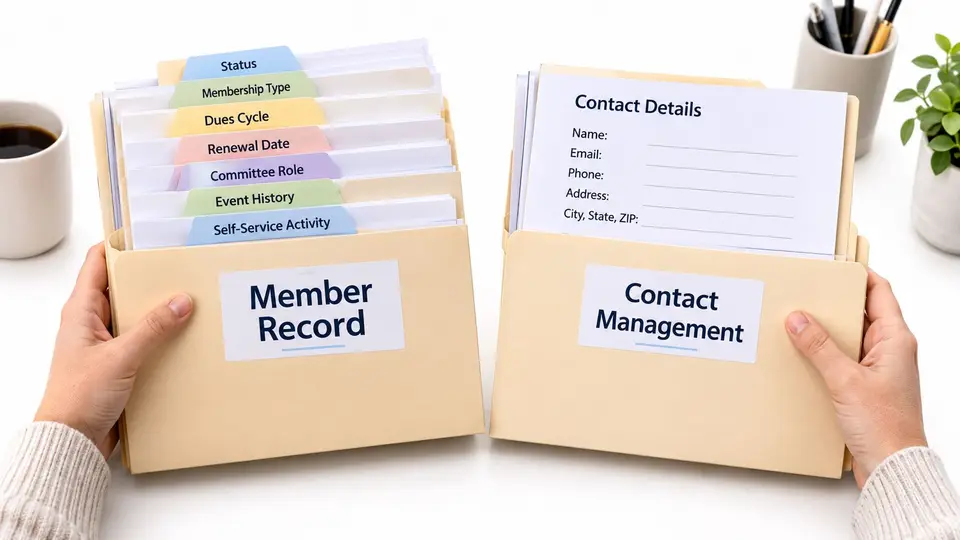
Say Maria Lopez is a paying individual member at $120 per year, chairs the Programs Committee, and made a $250 donation in the same year. In membership software, her record can connect her membership level, dues status, committee role, event history, and donation. campai follows this model as membership management software that manages members, dues, events, communication, finances, donations, and the Community App in one place.
In a CRM, Maria appears as a contact, while her donation and activities may be recorded separately. The team needs to decide how those records relate to her membership so staff can find a consistent account of her involvement.
A Quick Field Check
List your membership types, the dues amount for each, and the fields staff and volunteers need to see on a member record. Mark which information each system can represent directly. This helps reveal where the team will need to define how records connect and who keeps them current.
Tracking Dues and Renewals Through the Member Lifecycle
Dues and renewals run as a sequence with owners, dates, and decision points. Membership software generally treats those steps as routine administration. A CRM can support them too, but may require custom fields, workflows, and manual checks to keep membership status current.
Consider a hypothetical member who joins on Day 0 with annual dues of $120 and a renewal due one year later. The relative schedule below can be adjusted to match your organization's rules.
Seven Steps From Application to Lapse or Reactivation
- Record the application and type. The membership coordinator enters the application date, membership type, and contact details when the application arrives.
- Assign dues and renewal date. At approval, the coordinator records the $120 dues amount and sets the renewal date for one year after joining.
- Record payment status and send a welcome message. The treasurer confirms payment. Within two business days of payment, send a welcome message explaining how the member can get started.
- Link family members to the household. At enrollment, the coordinator connects related people while keeping a separate record for each person.
- Send a renewal reminder. The coordinator sends the first reminder 60 days before renewal, giving the member time to update details and pay.
- Open the renewal window. At 30 days before renewal, the coordinator tracks who is eligible, who has paid, and who needs another reminder.
- Set lapsed status if payment is overdue. After the organization's grace period, the coordinator confirms unpaid status with the treasurer and starts the reactivation process.
campai supports this workflow with automatic dues assignment, welcome emails with digital member IDs, family links that avoid duplicate records, and due-date reminders set according to the organization's preferences.
Why First-Year Members Need Their Own View
First-year members may need different follow-up from long-standing members as they learn about benefits, events, and groups. A cohort view lets staff distinguish new members and time onboarding messages separately from standard renewal reminders.
Before configuring the system, write down:
- Dues schedule: Amount by membership type and when dues are assigned
- Renewal dates: Whether renewals follow the join date or a common annual date
- Reminder timing: When the first, second, and final reminders go out
- Lapse rule: When an unpaid membership changes to lapsed status
- Reactivation approval: Who approves a return and what payment is required
Practical rule: If your team cannot state the lapse rule and reminder schedule in two sentences, settle those decisions before configuring the software.
Events, Communications and Member Self-Service
Follow one member through a typical event. The member finds the event in the member app or portal, registers, is added to the participant list, and receives a payment request linked to the booking when a fee applies. Afterward, attendance appears in the member history, so staff can see participation alongside dues status and committee roles.
That connection is the point. In membership software, event registration is tied to the member record rather than sitting in a separate list that someone imports later. campai automatically confirms event bookings, adds members to participant lists, and creates invoices linked to the booking. In a CRM-centered setup, events often live in a separate tool, and attendance reaches the contact record only if an integration or manual import keeps it current.
Communications Built on Membership Segments
Membership software can message segments defined by membership type, status, or committee. CRM campaigns usually segment by contact tags or pipeline stage, which works well for prospecting but may not reflect dues status without a sync.
Two copyable segment examples show the difference:
- Members with dues unpaid for 30 days: Send a payment reminder with a payment link and a clear contact for billing questions.
- Board members who have not updated their contact details: Send a short profile update request before the next meeting packet goes out.
What Members Should Handle Themselves
Member self-service should cover profile updates, online dues payments, event registration, documents, and bookings. campai's member app lets members find events, book activities, update details, and use rooms, chats, and tasks. When members update their own information in a portal like campai Community App, staff spend less time re-entering changes from emails and paper forms.
Check two things during any evaluation. Can members see their own records and payment status without emailing staff? Does event attendance feed back into the member history automatically? If the answer to both is no, plan for the extra manual work.
A CRM may still be the better tool for broad marketing campaigns or sponsor outreach. Keeping it for that purpose is reasonable, as long as member-facing activity still lands on the member record somewhere your team trusts.
Permissions, Data Quality and Integrations
Start with who should see what. A treasurer may need payment records, a membership coordinator may edit member profiles, and an event volunteer may only need a check-in list for Saturday morning. Those are three different responsibilities, and your permissions should match them.
campai lets customers assign roles and permissions to give staff and volunteers access to records, so each person sees the information their role requires. Whatever system you choose, list every role before launch, including board officers, committee chairs, chapter leaders where chapters exist, and temporary event help. Decide what each role can view, edit, and export, and review those settings when leadership changes.

Data Quality Problems That Affect Dues
Duplicate records and outdated addresses don't just affect email personalization. In a membership organization, they can produce duplicate membership applications, incorrect membership levels, repeated dues invoices, inaccurate renewal counts, and fragmented event histories. A member who appears twice may receive two invoices, renew under one record, and still look lapsed under the other.
Agree on one member identity and matching rules before any import. Decide which fields identify a unique person, how household or organization relationships are represented, and who approves merges when two records look alike. Apply the same rules when applications, event registrations, and self-service updates create new records later.
Write down the matching rule your team will use, for example name plus email plus date of birth, and test it on real examples before importing your full member database.
Integration Questions to Ask in Writing
Integrations deserve the same discipline. campai offers features covering members, groups, documents, dues, finances, events, communication, forms, donations, a member app, permissions, apps, and APIs, but any specific accounting or banking connection should be confirmed directly with the vendor before you assume it's available. Use this checklist with every vendor:
- Source of truth: Which system is authoritative for membership status, dues, and renewal dates?
- Accounting connection: Which accounting tools connect, and how does the connection work in practice?
- APIs and webhooks: Does the platform offer APIs and webhooks for workflows it doesn't cover natively?
- Data export: Can the team export member data in a usable format without vendor assistance?
- Conflict handling: When two systems disagree about a member's status, which record wins?
Write the answers down and keep them with your selection notes. Verbal assurances during a demo are hard to rely on six months later when a volunteer is troubleshooting a sync problem at 9 p.m. Eastern before an event.
When Each Approach Fits
A membership coordinator spending each week on dues, renewals, and event registration will usually benefit from keeping those tasks in one membership system. A team focused on sponsorship pipelines or prospect tracking may get more value from a CRM's opportunity stages.
| Situation | Better starting point | Why it fits |
|---|---|---|
| Dues, renewals, and events drive most daily work | Membership management software | Member records, dues, and registration stay in one system |
| Sponsorships or prospect pipelines dominate | General CRM | Pipeline stages and opportunity tracking suit sales-style work |
| Several volunteers need limited access to member data | Membership management software | Roles and permissions can be assigned by responsibility |
| Major-gift or donor cultivation runs as a long campaign | CRM alongside membership software | The CRM handles relationship work while dues stay in the membership system |
| Small team with no data administrator | Membership management software | Fewer systems to configure, reconcile, and train |
| Existing CRM already holds prospect and donor data | Keep both, with a named owner for membership status | Separate responsibilities can reduce duplicate records and conflicting renewal data |
For a small, volunteer-led team, a focused membership system reduces the systems to configure and reconcile. That can be a practical fit when the same people handle billing, events, and board reporting.
A CRM can also bring more setup and integration work before basic membership administration is stable. If renewal dates and dues status are unreliable, broader relationship tracking will not correct the underlying records. Stabilize those processes before adding tools for more specialized work.
Running Both Systems Together
A CRM alongside membership software can suit organizations with long donor or sponsorship campaigns. Gifts involve cultivation over time, while dues follow membership dates and eligibility rules, so the two systems can serve different workflows.
For a hybrid setup, settle system ownership before configuring integrations. Section 7 provides the ownership map and steps for assigning responsibility. Also decide how new contacts will be matched to existing records and where online payments will be reconciled. Without those operating rules, conflicting records can undermine staff confidence in both systems.
Confirm Who Owns Member Status Before You Choose
Before selecting a system, map who owns each record and decision. The map should identify one system and one accountable role for every core data item.
| Data item | Owning system | Owner role |
|---|---|---|
| Membership status and type | Membership system | Membership coordinator |
| Dues, due dates, payment status | Membership system | Treasurer |
| Event registrations and attendance | Membership system | Membership coordinator |
| Prospect and sponsor pipelines | CRM, if used | Executive director |
| Donor cultivation stages | CRM, if used | Executive director |
Use the map to guide six practical checks:
- List every system that holds member data. The treasurer and membership coordinator should identify spreadsheets, email lists, and event tools.
- Assign one accountable role to each data item. The owner resolves conflicting records and approves changes.
- Set matching rules for duplicate records. Agree on how the team identifies the same person before importing or syncing data.
- Test sample member journeys. Include an application, renewal, household, and lapsed membership to see where records and payment details should live.
- Document data handoffs. Specify which system is updated when a membership status changes, and how online payments are reconciled.
- Get integration details in writing. Keep the answers with the selection records so the team can refer to them during setup.
The map should make ownership clear before systems are connected. If a data item has no clear owner, settle that responsibility first; otherwise, staff may update different records and create conflicting information.