Member Database Setup for Clubs and Associations
Learn how to organize a member database for your club or association: essential fields, membership types, dues records, permissions, import mapping, and audits.

A treasurer opens the mail, finds a check for dues, and can't match the name to anyone in the current spreadsheet. The membership coordinator searches another file and finds the same person listed with a different spelling and an old email address. That's the everyday problem a well built member database solves. It gives administrators one reliable record to open instead of several files that drift apart without anyone noticing.
What an Administrator Member Database Holds
Say the treasurer in that scenario asks a simple question. Is this person an active member, and has the check already been recorded once? In a spreadsheet system, the answer depends on who updated which tab last. In an administrator member database, the answer lives on one record.

A member database is the administrator's single record of each person's membership, dues, participation, and contact preferences. It's not a public list, and it isn't meant for browsing by the full membership. It's the working system staff and volunteers use to run renewals, answer questions, and keep billing straight.
The Five Record Types Inside One Profile
Most confusion disappears once administrators stop thinking of a profile as one flat row. A complete record holds five connected pieces, and each piece answers a different question.
- Person record: Name, email address, mailing address, and phone. This answers who the person is and how to reach them.
- Membership record: Membership type, status, join date, and renewal date. This answers what they belong to and whether it's current.
- Dues record: Amount, billing period, and payment status. This answers what they owe and what they've paid.
- Participation record: Event registrations, bookings, and volunteer roles. This answers how they've taken part.
- Communication record: Email consent and preferences. This answers what they're allowed to receive and what they've opted out of.
Keeping these pieces connected but separate matters. When a member changes an email address, the person record changes, but last year's dues record shouldn't rewrite itself. When a membership lapses, the participation history stays intact for reporting.
How It Differs From a Directory and a CRM
A member directory is what members see. It usually shows a name, maybe a photo, and whatever contact details each person agreed to share. A sales CRM (customer relationship management system) tracks prospects and deals through a pipeline. Neither one is built to answer whether dues are current, when a renewal falls due, or which status a membership carries today.
Readiness test: Any staff member or volunteer should be able to open one record and answer two questions in under a minute. Is this person active, and when do they renew?
The principle underneath everything is one person, one record. Every later decision about imports, duplicates, and permissions exists to protect that rule. Tools such as campai, which is membership management software that manages members, dues, events, communication, finances, donations, and a member app in one place, are built around that same connected structure.
Essential Fields for Every Member Record
Open any record and count the fields. Each one should map to a task someone performs, whether that's billing, communication, access, or reporting. If nobody on staff can name the task a field feeds, the field doesn't belong in the database. That single test keeps the record useful instead of cluttered.
The table below shows the fields most clubs and associations need, with example values in US formats.
| Field | Example value | Purpose | Required |
|---|---|---|---|
| First name | Maria | Greeting and identification | Yes |
| Last name | Okafor | Identification and search | Yes |
| Email address | maria.okafor@example.org | Account login and notices | Yes |
| Mailing address | 123 Maple St, Springfield, IL 62701 | Printed notices and returned mail tracking | Optional |
| Phone number | (555) 555-0142 | Urgent contact | Optional |
| Membership type | Regular | Dues amount and benefits | Yes |
| Membership status | Active | Access, reporting and renewal workflow | Yes |
| Join date | 03/15/2022 | Tenure and history | Yes |
| Renewal date | 03/15/2026 | Dues cycle and reminders | Yes |
| Dues amount | $120.00 | Billing record | Yes for dues paying members |
| Household ID | HH-1042 | Links family members without duplicate records | Optional |
| Email consent | Yes, recorded 03/15/2022 | Communication preferences | Yes |
| Volunteer role | Membership coordinator | Access and task assignment | Optional |
| Coaching license (custom field) | Level 2, expires 12/31/2026 | Organization specific credential | Optional |
Required Versus Optional Fields
The required fields are the ones a record can't function without. Name and email address identify the person and support account login. Membership type, status, join date, and renewal date drive the renewal workflow. The dues amount is required for dues paying members, and dated email consent pins down when a member agreed to receive messages, which matters if a complaint ever arrives.
Optional fields support specific tasks. A mailing address matters when the organization mails printed notices. A phone number earns its keep the day an event gets cancelled on short notice. A household link and a volunteer role are useful, and a record still works without them. Optional has to mean optional in practice, so membership applications shouldn't block someone for leaving those fields blank.
Custom Fields and Data Minimization
Custom fields hold information specific to one organization. A sports club might track a coaching license with a level and an expiration date, as in the table. Membership software such as campai can store custom contact fields like a coaching license, so the credential lives on the member's record instead of in a side spreadsheet. Before adding a field, the administrator should confirm that a real workflow reads it, such as checking credentials before assigning a team.
Collecting less is a deliberate design choice that shrinks what you must protect. The NIST privacy guidance explains that unnecessary personal information retention increases exposure to unauthorized access or misuse, while minimization reduces the volume of data vulnerable to those risks. A field like favorite color, or a full birth date when eligibility doesn't require one, adds exposure and maintenance work without helping anyone.
Rule for a new field: Name the owner, the purpose, and the staff role that can edit it. If any of the three is unclear, don't add the field yet.
Set a retention rule for each record type before collecting data. Decide how long a former member's contact details stay in the database after the membership ends, and keep payment history for the period the organization's records policy requires. Write the rule into a field inventory alongside each field's purpose, editing role, and the deletion or anonymization action that applies when the period ends. Retention periods should be confirmed against the organization's own records policy or with counsel, since a general guide can't set those time limits.
Membership Types, Statuses and Dues Records
Two ideas get blended together more than any others, so it helps to separate them first. A membership type describes what a person buys. A membership status describes where that membership stands right now. One changes rarely, the other changes throughout the year.
Types Describe the Offer
Here's a hypothetical example price set for illustration. A club might offer Regular at $120.00 per year, Student at $40.00 per year, and Family at $180.00 per year. Under the Family type, each household member keeps an individual record linked to one family record, so the club bills once but still knows who each person is. The type controls the dues amount and the benefits attached, which is why it belongs on every record as a required field.
Statuses, by contrast, move. A person starts as an applicant, becomes active, may lapse, and eventually becomes a former member. Each status should trigger a specific next action, so nobody has to guess what a status means for their to do list.
| Status | What it means | Next action |
|---|---|---|
| Applicant | Application received, not yet approved | Review the application and confirm eligibility |
| Pending payment | Approved, but dues have not been received | Send a payment link and a reminder |
| Active | Dues are current and access is open | Send renewal notice before the renewal date |
| Lapsed | Renewal date passed without payment | Send a renewal reminder and keep the record |
| Canceled | Membership ended by the member or by a board decision | Restrict access and keep the payment history |
| Former member | Historical record only | Apply the retention rule for former members |
Notice that Lapsed and Canceled aren't the same thing. A lapsed member hasn't renewed yet and may still come back with a reminder. A canceled membership has ended by decision, either the member's or the board's, so access closes while the payment history stays on file.
The Dues Record as Its Own Ledger
Dues deserve their own ledger rather than a single paid or unpaid checkbox. Each dues record should carry the amount, the billing period, the due date, the payment instrument (online payment, check, or cash), and the payment status, such as paid, partially paid, past due, or returned online payment. Every change gets a dated entry, so the treasurer can reconstruct what happened months later without relying on memory.
Dues and donations also need separate transaction types. Dues are membership payments. Donations are voluntary gifts. The federal tax treatment differs, since the IRS guidance on 501(c)(6) organizations states that contributions to Section 501(c)(6) organizations are not deductible as charitable contributions on a donor's federal income tax return. Recording the two separately preserves accurate payment histories and supports clearer member acknowledgments.
Keeping the membership level and the benefits a member received with each payment serves the same purpose. When it's time to issue a receipt or acknowledgment, staff word it from the actual record instead of guessing what a payment covered.
Roles, Permissions and Privacy Controls
The starting rule for access is least privilege. Everyone begins with the narrowest access that lets them do their assigned work, and rights get added only when a task requires them. The question to ask isn't who is most trusted. It's what each person needs to do the job.
That caution is well founded. Verizon's 2025 Data Breach Investigations Report analyzed 22,052 real world security incidents, including 12,195 confirmed breaches, and found human involvement present in about 60% of breaches. A member database holds names, email addresses, mailing addresses, and payment related details, so it deserves treatment as a sensitive system rather than a casual spreadsheet.
| Role | Can view | Can edit | Should not access by default |
|---|---|---|---|
| Membership coordinator | Member profiles, applications, status and renewal dates | Contact details, statuses and applications | Donation receipts unless assigned |
| Treasurer | Dues ledger, payment status and donation records | Payment status and receipt records | Event waitlists and volunteer notes |
| Event volunteer | Participant lists for assigned events | Attendance check in only | Dues amounts, payment details and personal notes |
| Board member | Summary reports and membership counts | Nothing by default | Individual contact details unless a governance task requires them |
The Quarterly Access Review
Permissions drift because people rotate. A volunteer finishes a term, a committee lead changes, and the old access stays in place without anyone noticing. A short quarterly review catches that drift.
- Remove finished terms: Take away access for volunteers whose roles have ended.
- Confirm edit rights: Check that committee leads still need the editing access they hold.
- Log every change: Record the date and the reason for each adjustment.
Vendor access belongs in the same review. Accounts created for outside help can reach member data long after the people who set them up have moved on, so they should be checked on the same schedule as volunteer accounts.
Handling Member Privacy Requests
Members will ask to see, correct, or delete their data, and one simple process handles all three. The membership coordinator confirms the member's identity, makes the correction or provides the record, and applies the organization's retention rule to anything that must stay. Payment history and governance records, for example, are kept under that rule instead of being deleted on request. These steps are operational practices, not legal advice, so privacy obligations should be confirmed with the organization's counsel.
Importing Member Records With Field Mapping
Field mapping is the step where each spreadsheet column is matched to one database field. It's also the step where a small mistake spreads furthest, because a wrong match lands in every record and then flows into every report built on top of it.
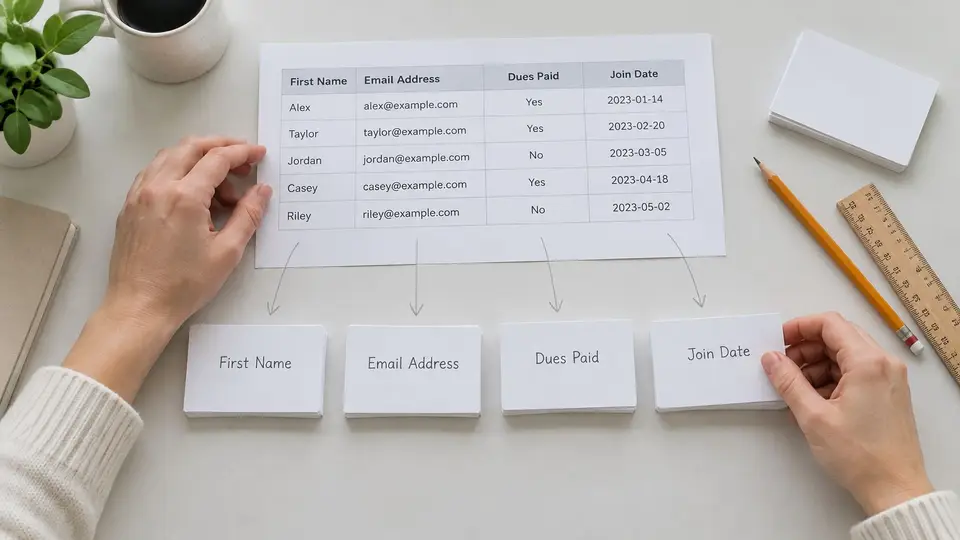
Take one example row first. A spreadsheet might hold Maria Okafor with Member Since 03/15/2022, Cell (555) 555-0142, and Dues Paid Yes. Mapping decides that Member Since lands in Join date, Cell lands in Phone number, and Dues Paid lands in Dues status. Once that logic is clear on one row, the full import follows a predictable sequence.
The Import Procedure Step by Step
- Export and preserve the original: Export the current member list as a CSV file and keep an untouched copy. If a mapping goes wrong, the team can restart from a clean source instead of repairing records by hand.
- Clean the file before mapping: Remove blank rows, test rows, and columns with no owner. Combine split name columns into one first name column and one last name column, so names import consistently.
- Map each column to one field: Match every spreadsheet column to a single database field, using the Maria Okafor row as the pattern. A column that maps to nothing either gets an owner and a purpose or gets left out.
- Standardize values before import: Format dates as mm/dd/yyyy, enter dollar amounts without currency symbols, and make status words match the controlled list, such as Active and Lapsed. Fixing formats in the file is far easier than fixing them record by record.
- Import a small sample first: Bring in 10 to 20 rows and review each value in its mapped field. This manual preview catches swapped columns and format problems while the damage is still tiny.
- Import the full file and verify: Compare record counts against the source file, then spot check five members from each membership type to confirm their details landed correctly.
A sample import feels slow for about ten minutes. Repairing a full file that mapped dues amounts into the wrong field takes much longer.
The verification step at the end isn't optional padding. Counts that don't match the source mean rows were dropped or duplicated, and it's far better to learn that on import day than during renewal season.
Cleaning Up Duplicate Member Records
Duplicates usually have ordinary causes. A member joins twice with two email addresses. A renewal gets entered as a brand new record. Two spreadsheets get merged and the same person arrives from both. The fix starts with matching rules applied in a consistent order.
Matching Rules in Order
Match on email address first, since it's the most reliable single identifier most organizations hold. Match on first name, last name, and postal address second. Flag name only matches for manual review third, because two different members can genuinely share a name, and merging them would be worse than leaving a duplicate in place.
Family members need care here. They share a household ID while each person keeps an individual record. That way a household is never collapsed into a single member, and headcounts stay honest.
The Merge Rule
When two records really are the same person, merge them the same way every time. Keep the oldest member ID, keep the most recent verified contact details, and combine the payment history so no dues record disappears. Then log the merge. A typical entry reads like this. Merge retired ID 1048 into ID 0213, 06/12/2025, approved by Membership Coordinator.
Cleanup isn't a one time project, though. A bounced email should trigger a verification request, a returned mail piece should flag the mailing address for review, and a member's self service update should be timestamped with its source. The membership coordinator works that bounce and flag queue weekly during the first cleanup, then monthly once the backlog clears.
Schedule Your First Database Audit This Quarter
A database stays trustworthy when someone checks it on a schedule. Put the first audit on the calendar within the next 30 days, and give every check one named owner. The cadence matters as much as the list: contact and money problems need fast attention, while policy questions can wait for an annual review.
| Check | Owner | Cadence |
|---|---|---|
| Email bounces and returned mail | Membership coordinator | Monthly |
| Lapsed records past renewal date | Membership coordinator | Monthly |
| Failed or returned online payments | Treasurer | Monthly |
| Payment status against the dues ledger | Treasurer | Monthly |
| Role assignments and access for volunteers who left | Board liaison and membership coordinator | Quarterly |
| Duplicate queue | Membership coordinator | Quarterly |
| Custom field usage | Board liaison | Quarterly |
| Field list against current programs | Membership coordinator | Annually |
| Retention rule for former members | Board liaison | Annually |
| Breach response contact list | Board liaison | Annually |
How to Work the Checklist
Work from the top down. Monthly rows protect the record while errors are still small: bounced mail points to contact verification, lapsed records and failed payments point to renewal follow-up, and the treasurer's ledger comparison keeps paid status honest.
Quarterly rows are calendar checkpoints. Confirm the access review and duplicate queue were worked, then record backlog size, dates cleared, and any person still waiting for a decision. That keeps slower risks visible without turning every quarter into a rebuild.
Annual rows ask whether the database still matches the organization. Retire fields built for discontinued programs, revisit the former-member retention rule, and refresh the breach response contact list so names, vendors, and the last reviewed date are current. Keep each result with the record: owner, date, outcome, next review.
An audit with a named owner and a date on the calendar happens. An audit that everyone agrees is a good idea usually doesn't.