Membership Application Form Template: What to Include
Copy a membership application form template, choose the fields you need, set up an approval and dues workflow, and test the form before accepting applicants.

A membership application form should collect the information you need to identify an applicant, determine membership type, and complete approval. Copy the template below, then adapt its fields and workflow to your club or association.
Copyable Membership Application Form Template
Membership Application, [Organization Name]
Full name (required): ____________________
Email address (required): ____________________
Phone (optional): ____________________
Mailing address (required only if you mail notices or materials): ____________________
Membership type (required): [ ] Individual [ ] Family [ ] Organization
Application date (required): ____________________
Preferred communication method (required): [ ] Email [ ] Phone [ ] Mail
Membership rules acknowledgment (required): [ ] I have read the membership rules provided by the organization.
Optional marketing permission: [ ] Send me news about programs and events not required for membership.
Submit to: [Coordinator name, email, or office location]
Questions: [Organization contact]
Keep payment card details off the application. Use the same field names in paper and online versions so you can transfer applications into member records consistently.
Choose the Fields You Need
Give each field a purpose. You need a way to identify the applicant and contact them, while membership type helps you determine the applicable dues and review requirements. Make a mailing address conditional if you only send materials to some members. Collect interests, such as volunteering, separately if they do not affect approval.
| Field group | Example fields | Collection decision | Operational use |
|---|---|---|---|
| Identity | Full name, email | Required | Create a member record and send a confirmation |
| Contact extras | Phone, mailing address | Optional or conditional | Call or mail the applicant when needed |
| Membership | Type, application date, communication method | Required | Review the application, identify dues, and contact the applicant |
| Interests | Committees, volunteering | Optional and separate | Follow up without delaying the application |
If no one uses a field to review an application or support membership, leave it out. This keeps the form focused and limits the personal information you need to maintain. FTC data security guidance also recommends collecting only the information you need and securely disposing of information you no longer need.
Adapt the Form for Your Membership Type
For individual membership, collect the applicant's details and selected membership level. For family membership, identify one primary applicant and add only the household details you need for access, communications, or registration. For organizational membership, ask for the organization name, a primary contact and their role, and a mailing address if you need one.
Keep the application date, membership type, rules acknowledgment, and optional marketing choice clear in each version. Use consistent field names when you accept both paper and online applications.
Set Up Approval and Onboarding
Decide who reviews eligibility and who can approve each membership type before you publish the form. When an application arrives, check required fields, request any missing information, record the decision, and set an effective date. Do not mark the member active before approval.
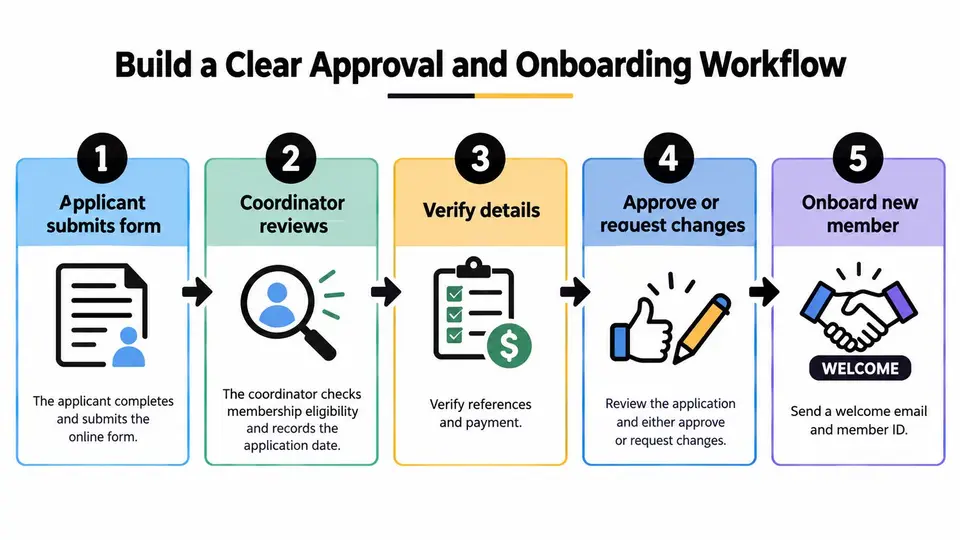
Collect dues through a separate payment process rather than putting card details on the application. For example, if your club charges $75 in annual dues, record $75 as the amount owed for that membership type, along with the due date and payment status. Keep any optional donation separate from dues so the applicant and treasurer can tell which payment is required for membership.
| Stage | Owner | Record or action | Check |
|---|---|---|---|
| Review | Membership coordinator | Required fields and eligibility | Request missing information |
| Approve | Authorized approver | Decision and effective date | Do not mark the member active early |
| Bill | Treasurer | Dues owed, due date, and payment status | Amount matches the membership type |
| Welcome | Coordinator | Confirmation and next steps | Include a contact for questions |
| Maintain | Coordinator | Corrections and renewals | Keep one current member record |
Tell applicants whether they have submitted an application or have been approved; those are different milestones. Once approved, send the effective date, dues instructions if applicable, and a contact for questions.
Keep Permissions and Applicant Data Clear
Ask only for information you need to review the application and manage membership. Avoid requesting Social Security numbers, card details, or health information unless your organization has a specific reason and an appropriate way to handle them. Tell applicants why you request any conditional field and who to contact to correct their information.
Keep the rules acknowledgment separate from optional marketing permission. Applicants should be able to submit the membership application without choosing marketing messages. Review the wording and data-handling practices for your own organization rather than treating a template as a legal guarantee.
Test the Form Before Launch
Try the form as an applicant and as the person who processes submissions. Include a phone, a computer, and a paper alternative if you offer one.
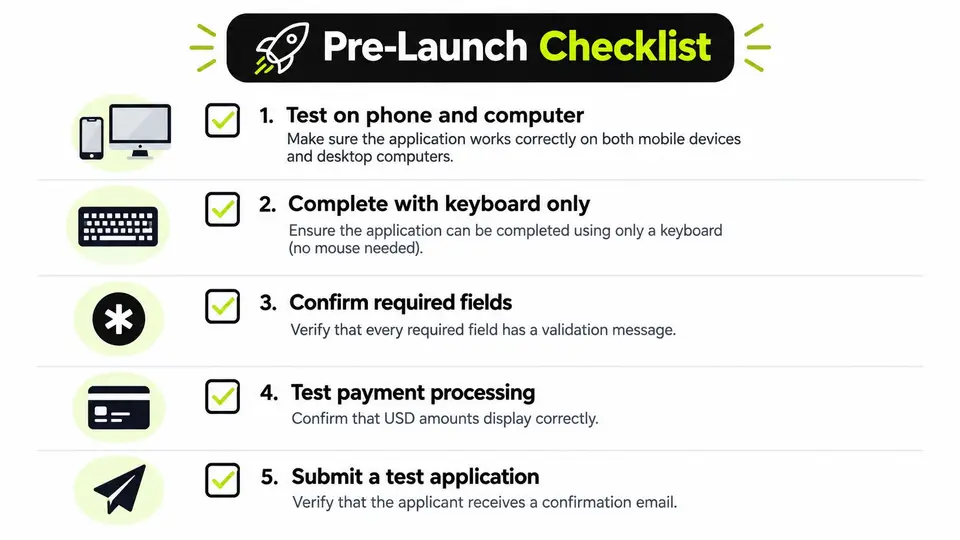
Test devices: Complete the form on a phone and computer; check what happens if you leave it partway through.
Test keyboard use: Move through each field without a mouse and check labels and visible focus.
Trigger errors: Enter an invalid email address and check that the message explains how to fix it without erasing valid entries.
Check duplicates: Submit a test application twice and confirm the coordinator can spot both entries.
Verify records: Check that membership type, approval decision, effective date, dues owed, and payment status appear in the right places.
Ask a new tester: Have someone who did not build the form identify which fields are optional and explain what happens after submission.
These checks align with W3C guidance on form instructions, labels, errors, and accessibility testing. Fix unclear fields or handoffs before you accept live applications.
When you're ready to move from applications to organized member records and follow-up, review how campai could fit your workflow. Book a demo