How to Choose Event Management Software for Nonprofits
Event management software for nonprofits should connect registration, attendee records, capacity, fees, and follow-up for US clubs and associations.

It is the Tuesday before the member dinner and the registration spreadsheet says 86 people are coming. The inbox says something else. A volunteer has a printed list from last week, the treasurer is matching payments by last name, and nobody can say for certain who is first on the waitlist.
That is the moment when event management software for nonprofits stops being a nice upgrade and becomes an operations decision. The right tool does not just sell a seat. It connects registration to the member database, attendance, communications, rooms, fees, and follow-up so the next person who runs the event starts from a record, not a reconstruction.
Why Member Events Outgrow Spreadsheets
Spreadsheets work fine for one small gathering with one owner. They start failing when the work splits. The membership coordinator owns sign-ups, a board volunteer owns the room, the treasurer watches payment status, and the executive director sends the reminder. Each person edits a slightly different version of the truth.
The problems show up in predictable places. A member registers under a nickname and gets charged the guest fee. A canceled seat never reaches the waitlist. A workshop fills, but the room booked for it holds fewer chairs than the form allowed. Afterward, attendance lives in a check-in sheet that never makes it back to the member record, so retention conversations start from memory.
The direct answer for membership organizations
For US clubs, associations, and membership-based nonprofits, event software is worth buying when it keeps one participant history across repeated activities. A member dinner, a chapter meetup, a two-day conference, and a family program are different jobs, but they all produce the same core information. Staff need to know who registered, what they paid, whether they attended, and what message they received next.
A standalone list answers none of that reliably. It captures names for one date and then goes stale. The next coordinator copies it, cleans it in a hurry, and inherits every duplicate and typo.
Practical rule: If a volunteer leaving would take the event history with them, the organization does not have a system yet. It has files.
The jobs to sort before talking to any vendor are concrete. Registration has to match people to membership levels. Attendee records have to survive the event. Capacity and waitlists have to be visible to more than one person. Booked rooms and equipment have to match headcount. Fees have to show a clear payment status. Messages before and after the event have to reach the right segment without three exports.
None of that requires a fundraising miracle or a large staff. It requires treating event registration as part of membership administration instead of a separate ticket counter. Organizations that make that shift can judge tools by workflow fit rather than by the longest feature list.
What Event Software Should Connect
A coordinator checks a member's history before sending invitations for the next program. The record shows who attended earlier events, which messages they received, and whether they joined as a member, guest, or volunteer. Event software connects each activity to that shared person record, so a member who attends a social in March and a training in October appears as one person with two activities.

What belongs in the event folder
A member record works like a filing cabinet, with a labeled folder for each event. For a US club or association, each folder should hold details staff can use again:
- Membership type and status: Whether the person is a current member, a lapsed member, a guest, or a volunteer, and which fee applies.
- Registration answers: Session choices, meal selections, accessibility needs, or other answers tied to that event.
- Attendance: Registered, attended, canceled, or waitlisted, recorded after the event.
- Group or chapter: A group for an interest-based activity, or a chapter when the person belongs to a branch of a larger organization.
- Communication history: Confirmation, reminder, schedule change, and follow-up, traceable to the same contact.
With those details together, a coordinator can see who attended recent trainings, which new members have not joined an activity, and which repeat guests may be ready for a membership conversation.
Keep three kinds of money separate
Membership dues are payments tied to a membership level and renewal cycle. Event fees pay for a specific activity. Donations are voluntary gifts. Record each separately so financial reports, acknowledgments, and follow-up stay accurate.
Access should match the job. A treasurer needs payment status; a program lead needs attendee answers; a check-in volunteer needs names and attendance. Roles and permissions let an organization give each person appropriate access and change it when responsibilities shift.
Some organizations also need event data to connect with other systems. An API, or application programming interface, can support that work, as can custom apps. Verify how those connections work in a demonstration before relying on them.
Registration Records Capacity and Follow-Up
Features only matter when they hold up under routine pressure. The useful test is not whether a form exists. It is whether registration, capacity, resources, fees, and messages behave correctly when people cancel, rooms fill, and plans change on short notice.
Registration as a governed form
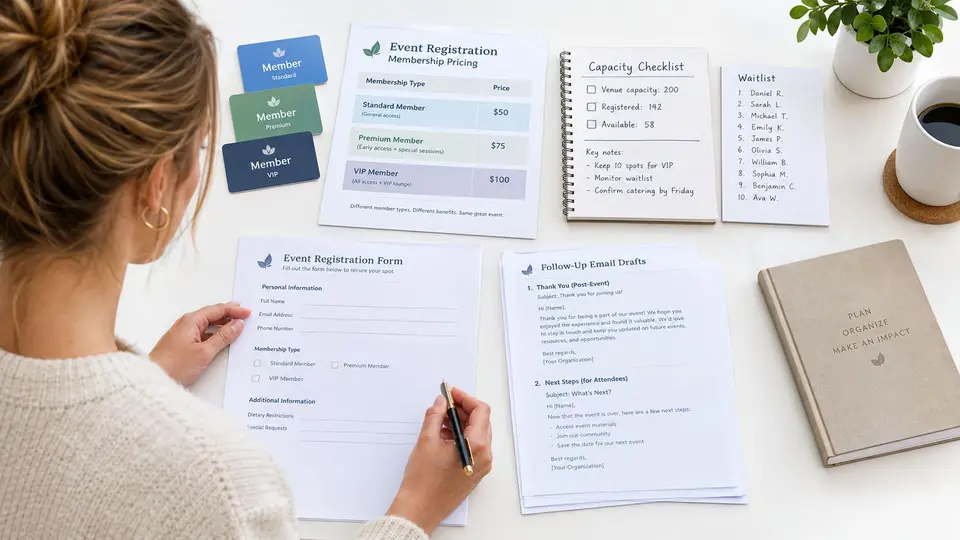
A registration form should know who is allowed to register and at what price. Members at different levels may see different fees. Guests may need a member host. Some activities are members only. The form should store answers on the attendee record, not in an email thread, and a canceled registration should update the participant list immediately.
Capacity and waitlists as operating rules
Capacity is not decoration. A workshop with 24 seats and a ballroom with a posted occupancy limit both need a visible count of remaining space and a clear waitlist order. When a seat opens, the next person should be identifiable without a phone tree. Staff should also be able to see bookings, waiting lists, and occupancy reviewed together, because a full session in a half empty room is still a planning problem.
Rooms and equipment deserve their own booking logic, separate from headcount. A court, studio, meeting room, or projector can be double-booked even when registration looks perfect. Resource bookings need their own calendar view tied to the event.
Fees with a visible status
Treat each fee as an event charge with a status someone can act on. The workflow should cover online payments, a payment link for someone who still owes, reminders based on the organization's settings, and a clear next step when an online payment is returned. Automatic confirmation of a booking, addition to the participant list, and an invoice linked to that booking remove three manual steps that small teams repeat constantly.
A fee is not collected until the record shows it. Verbal promises at the door do not reconcile.
Messages before during and after
Communications should pull from the same attendee record. Members need a confirmation at registration, a timely note when a start time moves to 6:30 p.m. ET, a waitlist offer when a seat opens, and a short follow-up after attending. Because the history is shared, a coordinator can message only first-time attendees, only waitlisted members, or only people with an open balance, without exporting and merging spreadsheets first. That segmentation is where connected records pay for themselves in staff time.
How Clubs Associations and Programs Differ
One feature list does not fit every event. The same tool has to be judged against the job, and the job changes with the audience, the stakes, and who is available to run it.

A recreation club monthly social
The club administrator needs member self-service so members register themselves, a simple fee, one room booking, and one reminder. A volunteer owns check-in on the night. The treasurer reviews payment status the next morning and follows up on open balances. Registration can open two weeks out because the format repeats and the audience knows the drill.
Success here is not ticket volume. It is members showing up regularly, new members meeting people, and nobody spending a Sunday rebuilding the list. A member app that lets members find events, book activities, and update their own details fits this rhythm well.
A professional association two-day conference
The association manager carries more moving parts. Membership types drive pricing, for example a $50 member fee and a $75 guest fee as a labeled hypothetical, not any vendor's price. Workshops need session level capacity and a waitlist when a popular session fills. Sponsor and exhibitor names belong in records, not a side spreadsheet. Messages need scheduling across Eastern Time for a regional audience.
A workable timeline opens registration six weeks out, reviews capacity and room assignments at two weeks, and sends final logistics one week ahead. Education and renewal value drive this event, so attendance by membership level matters more than raw headcount.
A community nonprofit family program
The coordinator registers members and guests together, assigns volunteers to specific roles, and keeps any voluntary donation tracking separate from the program fee. Follow-up thanks families, shares the next program date, and does not assume every payment needs the same acknowledgment. Community access is the goal, so a low friction form and clear fee waivers matter more than elaborate ticket tiers.
Across all three, the pattern holds. The event succeeds when one owner can see registration, space, money, and messages in the same place, because a membership can then be followed from application to renewal without piecing together spreadsheets and separate tools.
How to Compare Membership Event Tools
Membership teams choosing event software are really choosing among three ways of working. Each approach can function. Each one breaks at a different point, and the breaking point usually involves whether event data returns to the member record.
Three Ways to Run Member Event Records
| Approach | Best fit | Watch-out |
|---|---|---|
| Standalone registration page plus spreadsheets | One occasional event with a single owner and no waitlist | Attendee history stays trapped in files, and handoffs fail when the owner changes |
| Separate form, email, and payment tools used together | Teams that already use each tool well for other work | Someone must reconcile names, fees, and messages across systems after every event |
| Membership management software that includes events | Recurring member events, conferences, and programs run by small teams | Requires setup discipline on membership levels, fields, and permissions at the start |
Terminology narrows the search faster than feature pages do. Association management software (AMS) is the fitting label for professional and trade associations. Membership management software is the broader category for clubs and membership nonprofits. The label matters less than four tests. Does registration update the member database. Can more than one person see capacity and waitlists. Can rooms or equipment be booked with the event. Do confirmations and reminders use the same contact record.
In that third category, campai keeps event registration, bookings, and communication on the member record. Whatever vendors make the shortlist, hold each one to the same demonstration. Ask the sales rep to cancel a registration live and show the cancellation flowing through to the participant list, the capacity count, and the payment status. A tool that handles that cleanly will handle most of what a small team throws at it. A tool that hesitates tells you where the manual work will land.
Two cautions belong in any honest comparison. The vendor named above operates from Germany, so no one should infer US offices, hosting, or an existing American customer base. Current US fit, including payment methods, check-in options, integrations, and pricing, should be confirmed directly in a demo rather than assumed from a feature page. Apply that same discipline to every vendor on the shortlist.
Decision test: Whichever approach requires the fewest manual reconciliations by the smallest team usually wins, even if another option lists more features.
A Vendor Evaluation Checklist You Can Use
Opinions do not survive a board meeting. A scored test does. Copy the checks below into a simple sheet, assign one owner per group, and run every item live in the demo with test data before scoring anything.
Run these tasks in the demo
- Registration and member match: Register one current member and one guest. Confirm each sees the correct fee and lands on the correct record.
- Cancellation: Cancel one seat and confirm the participant list, capacity count, and payment status update right away.
- Capacity and waitlist: Fill a 20 person session completely, then offer the opened seat to the next waitlisted person.
- Resource booking: Try to book the same room twice for overlapping times and confirm the system flags the conflict.
- Fees and payment status: Create an unpaid registration, send a payment link, and check who can see the balance and who cannot.
- Messages: Send a confirmation, a reminder triggered by the organization's own settings, and a follow-up to attendees only.
- Attendee history and exports: Export the attendee list, then open a member record and confirm the participation still shows after the event ends.
- Permissions: Log in as a check-in volunteer and confirm financial details stay hidden.
Flexible fields, groups, and permissions, along with personal help during setup, matter here because small teams inherit whatever structure is chosen on day one. Advanced options for tasks, permissions, apps, and APIs only help if the basic workflow passes first.
Settle data ownership before signing
Three short decisions prevent most post-event confusion:
- Record owner: Name the person responsible for attendee records for each event.
- Message consent: Decide how permission for event messages is captured at registration.
- Three measures: Review registered, attended, and follow-up sent after every event, in plain counts the board can read.
Accessibility of the full registration path, from form to payment to cancellation, and the handling of card data should be confirmed with the vendor and with qualified advisors. Those are procurement questions to ask directly, not details to gloss over in a feature tour. A completed score sheet gives the board a decision, not a debate.
What to Do Before Your Next Event
Pick the next real event on the calendar. Not a hypothetical one. A real date with real members concentrates the decision and exposes which gaps matter now versus someday.
Name three owners before anything else. One person owns registration and the attendee list. One owns capacity, waitlists, and room or equipment bookings. One owns messages, from confirmation through follow-up. Small organizations often give all three jobs to whoever volunteers first, then wonder why details slip when that person gets busy.
Write the event goal in one line. Member retention, conference education, volunteer recruitment, or community access each point to different fields and different follow-up. Then list the fields that must return to the member record when the event closes, such as attendance, session choices, and fee status. If a field will never be used again, stop collecting it.
A simple four week timeline
- Four weeks out: Confirm the tool or settle the workaround, including capacity limits and resource bookings.
- Three weeks out: Open registration and send the first invitation to the right membership segment.
- One week out: Review the waitlist, confirm rooms and equipment, and send final logistics with labeled times.
- Within three business days after: Record attendance, close out open balances, and send the follow-up while the event is still fresh.
Run the checklist against no more than three vendors. A longer list sounds thorough but usually stalls a volunteer board. Three scored demos produce a clear front runner and an honest list of trade-offs.
If keeping members, bookings, communications, and self-service together matches the need, the sensible next step is to see that workflow running with realistic test registrations rather than assume a fit from a brochure. Bring the checklist, bring the next event date, and make the vendor work through both.
See how connected member records, event bookings, waitlists, communications, and member self-service work together for a club, association, or membership nonprofit. Book a demo