Member Communication Plan: A Monthly Calendar for Clubs
Build member communication for your US club or association: clear segments, named owners, the right channels, a monthly calendar, and useful measures.

Your treasurer just asked whether the dues reminder went out, and the communications volunteer says it sat inside last month's newsletter. Half the members never opened that issue. The rest read the picnic recap and missed the deadline under it. That mix-up is what a member communication plan is built to stop.
Write the roles and the dates first. A template or a tool only helps after someone owns each send and the month isn't already full.
What Goes Into a Member Communication Plan
A member communication plan is a short written document that names who receives each message, which channel carries it, who writes and approves it, and when it goes out.
Most clubs and associations send four kinds of messages, and each one behaves differently. Putting all four into one blast is how a payment deadline gets buried under volunteer news.
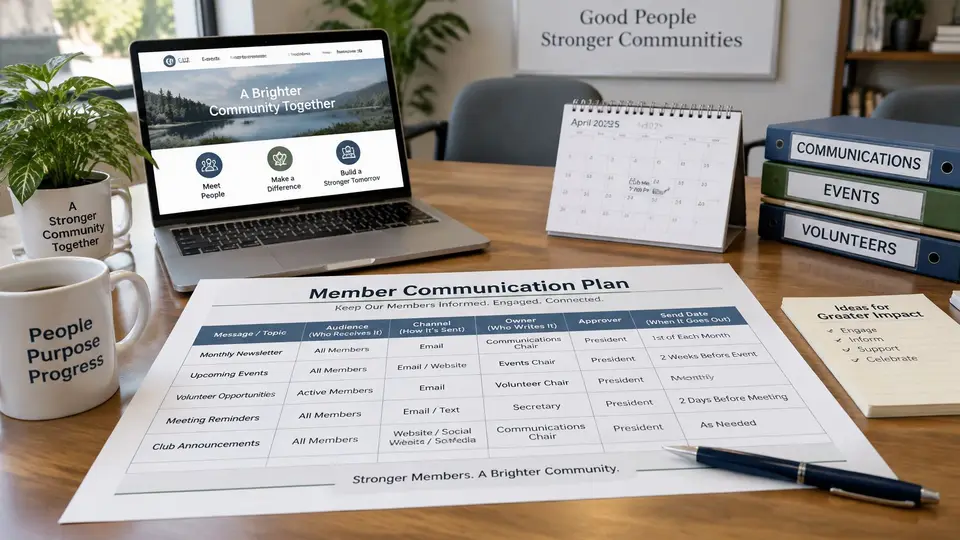
Four sends with different jobs
Onboarding helps a new member find a member ID, dues details, and the people to contact. It runs across the first 30 days after joining. A welcome email goes out first. The member portal or app comes next, once the person knows where to look.
Renewal messages name the membership dues, the deadline, and how to pay. Start them 60 days before the due date. Members who don't answer get a personal follow-up, not another copy of the newsletter.
Event updates cover schedule changes, registration deadlines, and logistics. The first note goes out three to four weeks before the event. A short logistics note follows in the final week, and only to people who are registered.
General newsletters share news, member stories, and volunteer opportunities on a fixed day each month or quarter. They are not a backup place for a dues deadline.
Write one purpose sentence for each message type before you choose any tool or template.
| Message Type | Main Purpose | Typical Timing | Usual Channel |
|---|---|---|---|
| Onboarding | Help new members find their member ID, dues details and key contacts | First 30 days after joining | Welcome email, then member portal or app |
| Renewal | Remind members of membership dues, the deadline and how to pay | Start 60 days before the due date | Email, with a personal follow-up for members who have not responded |
| Event update | Share schedule changes, registration deadlines and logistics | Three to four weeks before the event, with a final logistics note | Email, with app notifications for registered members |
| General newsletter | Share news, member stories and volunteer opportunities | Fixed day each month or quarter | Email newsletter |
Give each type its own send, its own purpose, and its own timing. If a sentence can't say what the reader should do next, it doesn't belong in that message.
Split Members Into Segments You Can Actually Use
Segments come from fields already sitting in the member database: join date, membership type, dues status, event registration, and committee role. If a field isn't current, the list will be wrong, so check those five fields before anyone builds a send.
A useful list stays at six or seven segments. Each one should map to a field someone can check in a few seconds. Career-stage tags and interest codes that nobody updates will send the wrong note to the wrong people.
| Segment | Who Belongs | What They Need Most | Suggested Channel |
|---|---|---|---|
| New members | Joined within the last 30 days | Welcome, orientation and first event details | Email, then member portal |
| Members in good standing | Dues current with no open issues | Newsletter and event news | Email newsletter |
| Renewal due | Dues due within the next 60 days | Dues amount, payment link and deadline | Email, with personal follow-up if no response |
| Past-due members | Dues past the due date | A clear amount owed, payment options and a contact for questions | Email, then phone call by staff or a volunteer |
| Event registrants | Signed up for a specific event | Logistics, schedule changes and reminders | Email tied to the event |
| Committee volunteers | Serve on a committee or task team | Meeting agendas, task deadlines and decisions | Group email or member app group |
| Board and officers | Hold governance roles | Meeting packets, votes and deadlines | Email with shared files |
A month with forty renewals
Say a 300-member community arts association has about 40 renewals landing in the same month. Those 40 people need the amount, a payment link, and the date. The other 260 need the newsletter. The treasurer sends the dues email only to the renewal-due segment. The communications volunteer still sends the newsletter on its usual day, without the payment paragraph pasted in.
People land in more than one segment. A committee volunteer whose dues are past due gets the past-due message first, because standing affects whether they can keep the role. The volunteer agenda waits until the dues note has gone out. Don't merge the two into one email "to save a send." The member then has to hunt for the amount owed under a task list.
Practical rule: If two segments overlap, send the message that changes the member's standing before the one that asks for more work.
Skip segments you can't refresh from the record. "Interested in workshops" is useless if that box was checked three years ago and never reviewed. Membership level, payment status, and a dated registration are fields a coordinator can trust on a Tuesday afternoon.
Choose Channels and Name an Owner for Each Message
Each message needs one owner, one backup, and one approver. Assign those jobs to roles, not to a person's name. When a volunteer leaves a committee, the plan still says who writes the next reminder.
Email carries most operational notes. The member app or portal holds documents and group conversations that shouldn't live only in an inbox. A personal phone call is for past-due members who haven't answered two emails. Postal mail is for members whose record shows they prefer a letter. Don't add a channel because another club uses it. Add it when a segment won't see the message any other way.

Approvals protect the numbers. A renewal email has to match the dues amount in the treasurer's records. A policy change goes to the executive director before it leaves the building. The backup doesn't rewrite the message. The backup sends the approved version if the owner is out.
Here is a renewal reminder you can adapt. The $150.00 figure is a hypothetical annual dues amount, not a price from any software vendor.
Subject: Your [Club Name] dues are due on [due date]
Hello [First name], your annual membership dues of $150.00 are due on [due date]. You can pay online with the payment link below, or contact the membership coordinator at [email set] with questions. Thank you for supporting [Club Name].
Replace $150.00 with the amount confirmed in your records. Leave the member's name, the date, and the link as fields someone checks before send, not as text typed from memory.
| Message | Owner | Backup | Approver |
|---|---|---|---|
| Welcome and onboarding emails | Membership coordinator | Office volunteer | Executive director |
| Renewal reminders | Treasurer | Membership coordinator | Treasurer |
| Event updates | Events chair | Membership coordinator | Executive director |
| General newsletter | Communications volunteer | Executive director | Board communications liaison |
| Board and governance notices | Board secretary | Executive director | Board president |
| Member replies and questions | Membership coordinator | Volunteer front desk | Executive director for policy questions |
Save a one-page handoff beside the plan. It should say where each template lives, who approves it, and which field supplies the amount or the date. The next owner shouldn't have to reconstruct that from old sent mail.
Build a Monthly Communication Calendar
A calendar turns owners and segments into dates. A monthly view shows an overload before members feel it, which is earlier than waiting for complaint emails.
The club, dates, and volumes below are illustrative. Riverside Tennis Club is a made-up example, not a case study.
Five steps before you fill the grid
- List every recurring message. Include the newsletter and each renewal cycle, not only the sends that feel urgent this week.
- Pin fixed-day messages first. Put the newsletter on the first Tuesday, or whichever weekday your members already expect.
- Place renewal reminders against each member's due date. Don't batch every member into the calendar month just because the treasurer has one free afternoon.
- Add event messages on the event clock. The first note lands three to four weeks out. Logistics stay in the final week, and only for registrants.
- Cap each segment at two messages in one week. If a third note lands on the same people, move it. Cutting a sentence out of the newsletter doesn't count as moving it.
| Week | Message | Segment | Owner | Channel |
|---|---|---|---|---|
| Week 1 | Monthly newsletter with court schedule and tournament news | Members in good standing | Communications volunteer | |
| Week 1 | Onboarding check-in for members who joined last month | New members | Membership coordinator | |
| Week 2 | First renewal reminder with payment link | Members with dues due in about 60 days | Treasurer | |
| Week 2 | Volunteer task reminders for spring clean-up | Committee volunteers | Events chair | Member app group |
| Week 3 | Tournament registration reminder | Event registrants and invited members | Events chair | |
| Week 3 | Second renewal reminder | Renewal due in the next 30 days | Treasurer | |
| Week 4 | Tournament logistics and parking update | Event registrants | Events chair | |
| Week 4 | Past-due follow-up with payment options | Past-due members | Membership coordinator | Email, then phone call |
Week 1 stays light for people in good standing: one newsletter. New members get their own check-in, so orientation isn't competing with court news. Week 2 splits money from volunteer work. The treasurer's reminder doesn't go to the clean-up crew unless those people are also in the dues window. Week 3 is the risk week. Invited members might also be in the 30-day renewal group. If the same person would get both emails, send the renewal on Monday and hold the tournament note until the next week, or drop the invite from the renewal list's second touch. Week 4 is logistics and past-due follow-up. Those audiences shouldn't be the whole club.
Review the grid on the last business day of the month. Carry unfinished items forward with a new date and the same owner. A slipped reminder that "we'll include next time" is how deadlines disappear again.
Manage Preferences, Opt-Outs, and Clean Contact Data
A member agreed to hear from you when they joined, renewed, or updated a form. Record where that agreement came from and what it covers. Membership alone doesn't grant permission to write whenever, and treating it as blanket consent is how fatigue starts.
Set the choices so newsletters, event alerts, volunteer requests, and text messages are separate boxes. One yes on the application covers the topic and channel the member saw at the time, nothing more. Operational notices, such as a dues deadline or a canceled class, can stay on a short must-send list. Educational stories and extra event promotion follow the boxes the member checked.
When someone opts out
Honor the request quickly. Mark the member record so the address leaves every active list, not only the newsletter. Before the next import, check the older spreadsheets: a volunteer file from last spring will put the address back if nobody screens it.
Keep a single suppression note on the record: date, which list, and who processed it. The membership coordinator owns that note. The communications volunteer checks it before a broadcast. The treasurer checks it before a promotional dues series, while a factual amount-and-deadline notice can still go out when the organization counts it as operational. When the team can't agree on where that line sits, ask association counsel instead of guessing.
A short clean-up after every send
Whoever sent the message owns this list, and the membership coordinator spot-checks it before the next broadcast.
- Flag bounced addresses the same day the send finishes. Waiting for a quarterly scrub means the next campaign mails the same dead address again.
- Update from the member's own reply. A new address in a signature beats a guess from the old application.
- Merge duplicate records for the same person so a second profile doesn't undo the opt-out.
- Remove former members from active lists when the membership ends. Keep the history. Stop the sends.
- Keep texting separate from email. Require a recorded opt-in for texts before any texting tool is used. A phone number on the application gives you a contact route; consent for automated texts is a separate record.
A returned online payment and a bounced email are different problems. A failed charge is a billing status. A bounce is a bad address. Don't use a failed payment as a reason to email a second, older address you never confirmed.
Measure Whether Members Read, Respond, and Renew
Opens are a weak signal. Some email apps load images on their own, so a high open count can mean nothing about whether anyone read the note. Watch clicks, replies, and outcomes: dues paid, event registrations, and questions that show a missing fact.
Compare each segment with your own last six months. Published averages describe other organizations' members, dues, and events. They won't tell you whether your Tuesday newsletter is too long.
- Clicks show whether the content matched what that segment needed. If they fall, check the subject line, where the link sits, and whether the segment got too broad.
- Unsubscribe requests after a send show a message that felt too frequent or off topic. Look at that week's count for the same people, not at the wording alone.
- Bounced addresses show outdated contacts. Start with recent joiners and anyone who updated a record by hand.
- On-time renewals show whether reminder timing and the payment link are doing the job. If people click and don't pay, check the link and the amount on the page before you rewrite the subject.
- Event registrations before the deadline show whether the note reached the invited group with a working registration path. Late logistics fixes won't repair a reminder that went to the wrong list.
- Questions to staff about dues or events show a message that didn't answer the question. Missing dates, amounts, or links create those tickets.
Once a month, put each segment's results side by side. Mark the three strongest messages and the three weakest. Write one change to test next month, not five. Treat unsubscribes as a trend across several sends. Treat a sudden jump after a single send as a reason to review that audience and that week's frequency. A past-due email that gets clicks and no payments is a link or an amount problem. It isn't a subject-line problem until those two are confirmed.
Confirm Your First Quarter Plan This Month
Book 60 minutes with the people who own messages. Bring three things: a count of members in each segment, the list of messages sent last quarter, and the upcoming renewal dates. Without those three, the meeting turns into a debate about tone.
- Pick three message types to fix first. Renewals and onboarding usually earn the spots, because missed dues and a silent first month cost members faster than a plain newsletter.
- Name an owner, a backup, and an approver for each of those three. If a role is vacant, the executive director holds it until the board fills it. Don't leave the cell blank.
- Transfer the next three months onto the monthly calendar you already built, so every send leaves this meeting with a fixed day and a named segment.
- Set one measure per message type and a review date. Renewals can use on-time payments. Onboarding can use a completed profile or a first event registration. The newsletter can use clicks on the one link you care about.
- Save the plan where every owner can open it. Store it in shared space, not on one laptop, and keep the handoff note, the templates, and the suppression list beside it.
campai connects member records, dues, events, and communication, so the segment counts and renewal dates you bring to this meeting come from the same records owners send from. You can design messages, choose recipient groups, and collect responses with custom forms, which gives each measure a place to live before the review date.
When the draft calendar and the owner table are filled in, walk through the setup with your team. Book a demo and bring the segment counts from the planning meeting.