
Here you can find how to get started with the campai api and see quick samples of API requests.
For contacts, use the CRM API reference.
To start using the campai API, the only thing you need is to create an API Key on your organization. The scoped for each organization, so you need a different API Key for each organization you want to integrate with the API.
If you want to generate a client for your language you can find the OpenAPI Declaration of the campai API here.
To create an API Key, you need to access your organization on campai and access the API & Developer page. On this page, you can manage your existing API Keys and create new ones.
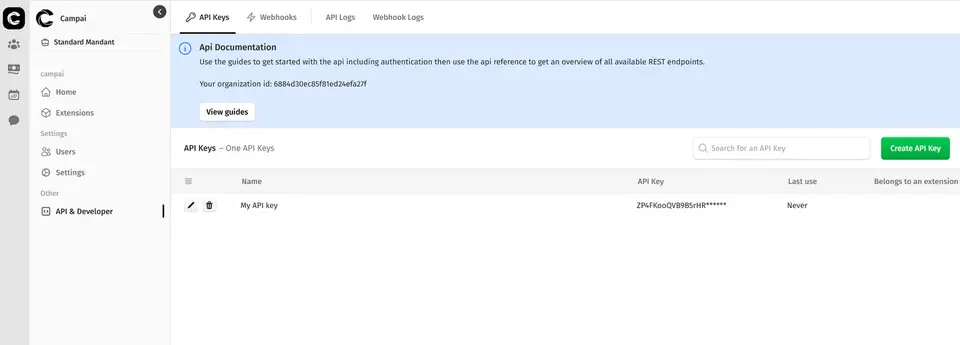
Once the API Key is created, make sure to save it somewhere safe. You won't be able to see the key anymore. This key can be used on all endpoints that require authentication and must be added as a request header with the name "X-API-Key".
X-API-Key: yourApiKey
To test the API key and ensure you have set up everything correctly, you can send a request to the endpoint that retrieves the API Key information, which also contains the organization ID the API key is bound to. You will need the organization ID for pretty much all API requests that you'll write. It is a immutable value, so you only need to get it once.
In the next sections, you'll learn how to perform advanced operations with the API as well as find all endpoints we currently have available. We are constantly updating the API and adding more endpoints, so stay tuned!